Touchless Door Entry Systems: A Smarter Way to Secure Your Property
Security has changed significantly over the years. Traditional keys and standard access cards are still common, but businesses and property owners are increasingly looking for solutions that provide better convenience without compromising security. This is where modern touchless door entry systems are becoming an important part of access control.
Instead of requiring users to physically touch a keypad, handle, or access device, touchless systems can allow entry through technologies such as mobile credentials, proximity sensors, Bluetooth, RFID, facial recognition, or other contact-free authentication methods. This makes entering a building easier while helping property managers maintain greater control over who can access specific areas.
Whether you manage an office, apartment building, healthcare facility, retail store, hotel, or commercial property, understanding how touchless access works can help you determine whether it is suitable for your security requirements.
What Are Touchless Door Entry Systems?
At a basic level, a touchless door entry system is an access control solution that allows an authorized person to enter a secured area without physically interacting with a traditional key or keypad.
Depending on the system, authentication may happen through a smartphone, access card, key fob, biometric technology, or proximity detection. Once the system verifies the person’s credentials, it communicates with the electronic locking mechanism and allows the door to unlock.
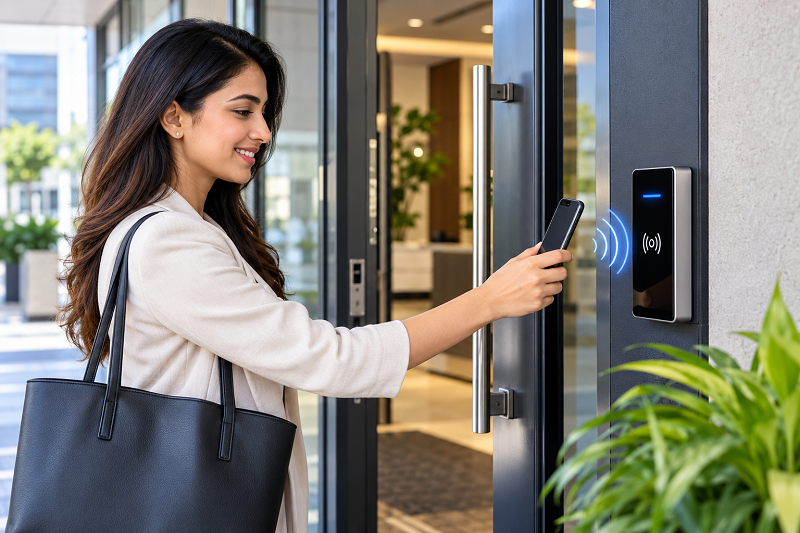
For example, an employee might approach an office entrance with an authorized smartphone. The system can recognize the mobile credential and unlock the door without requiring the employee to insert a key or enter a PIN.
The exact technology varies between systems, so businesses should consider their building layout, number of users, security requirements, and budget before selecting a solution.
How Do Touchless Access Systems Work?
Although the technology behind modern access control can be sophisticated, the basic process is relatively straightforward.
First, the system identifies a user through an approved credential. This could be a smartphone, RFID card, key fob, biometric identifier, or another authentication method.
Next, the access controller checks whether the credential has permission to enter that particular location. Access permissions can often be configured according to users, doors, schedules, or departments.
If the credentials are valid, the controller sends a signal to the electronic lock. The door then unlocks for the configured period before automatically securing itself again.
This process can happen within seconds, creating a smooth experience for employees, residents, customers, and visitors.
Key Benefits of Touchless Door Entry
One of the biggest advantages of touchless door entry systems is convenience. Users do not necessarily need to carry traditional keys or repeatedly enter access codes. Depending on the technology used, simply presenting an authorized credential near the reader may be enough to gain access.
Another important advantage is improved access management. Traditional keys can be copied, lost, or shared. Electronic access control gives property managers the ability to assign individual credentials and remove access when an employee leaves, a tenant moves out, or a visitor’s authorization expires.
Touchless access can also help businesses create a more modern entrance experience. Customers and visitors may appreciate being able to enter a facility without touching frequently used surfaces.
Improved Security and Access Control
Security is often the primary reason organizations consider upgrading their entrance systems.
A properly configured access control system can provide detailed information about authorized entry activity. Depending on the system, administrators may be able to see when credentials were used and which doors were accessed.
This can be particularly useful for offices and commercial facilities where different employees need access to different areas.
For example, employees working in an accounting department may need access to general office areas but not a server room. An electronic system can be configured to provide access based on the employee’s role.
Administrators can also deactivate credentials without changing physical locks. This can make access management more efficient, especially in larger properties with frequent staff changes.
Where Can Touchless Entry Systems Be Used?
The flexibility of modern access control makes these systems suitable for many different environments.
Commercial offices: Businesses can use contactless access to control entrances, employee-only areas, meeting rooms, and restricted facilities.
Apartment buildings: Property managers can provide residents with electronic credentials while controlling access to shared entrances, parking areas, gyms, and other amenities.
Hotels: Hotels can use electronic access technologies to provide convenient room and facility access while managing permissions for guests and staff.
Healthcare facilities: Hospitals and clinics often have areas that require controlled access. Electronic systems can help restrict entry to authorized personnel.
Retail stores: Staff-only rooms, stockrooms, offices, and other restricted areas can be protected while maintaining convenient access for employees.
Educational institutions: Schools, colleges, and training centers can use access control to manage entry into classrooms, offices, laboratories, and other restricted areas.
Touchless Technology Options
Not every touchless access system works in the same way. Several technologies are available, and each has different characteristics.
Mobile Access
Mobile credentials allow users to use smartphones as access credentials. Depending on the system, technologies such as Bluetooth or NFC may be used to communicate with the access reader.
Mobile access can be particularly convenient because many people already carry their smartphones throughout the day.
RFID and Proximity Credentials
RFID cards and key fobs allow users to authenticate themselves by presenting an authorized credential near a reader. These systems are commonly used in offices, apartment buildings, and commercial properties.
Biometric Access
Some systems use biometric authentication such as facial recognition or other biometric identifiers. These solutions can provide another layer of identity verification, although organizations should carefully consider privacy, data protection, and local legal requirements before implementing biometric technology.
Hands-Free Sensors
Certain environments may use sensors or proximity technologies that detect authorized users and trigger access automatically. These solutions can be useful where users frequently have their hands occupied.
Choosing the Right System for Your Property
Before purchasing an access control solution, it is important to look beyond the word “touchless.” Different systems offer different levels of security, convenience, integration, and administration.
Start by identifying which doors need protection and how many people will need access. A small office may require a relatively simple system, while a multi-building property may need centralized management.
You should also consider whether the system needs to integrate with existing security cameras, alarms, intercoms, elevators, or building management systems.
Another important factor is what happens if a phone, card, or credential is lost. A good access control solution should allow administrators to quickly revoke credentials and issue replacements.
Maintenance and Reliability Matter
Even advanced access control technology requires proper maintenance. Door hardware, electronic locks, readers, sensors, and software should be inspected regularly to ensure reliable operation.
Businesses should also have a backup plan for situations such as power failures, network problems, or system outages. Depending on the installation, backup power and alternative access methods may be appropriate.
Regular software and firmware updates can also help maintain system performance and security.
Are Touchless Door Entry Systems Worth Considering?
For many modern properties, touchless access offers a combination of convenience and controlled entry that traditional keys cannot easily provide. The ability to manage credentials electronically, adjust permissions, and monitor access activity can make security administration considerably easier.
However, the right solution depends on the property’s requirements. A small business may need a straightforward mobile or proximity system, while a large commercial facility may require centralized access management with multiple authentication methods.
The goal should not simply be to install the newest technology. Instead, property owners and facility managers should choose an access control solution that provides an appropriate balance between security, usability, reliability, and cost.
Final Thoughts
The way people enter buildings is becoming increasingly digital. As organizations look for more convenient and manageable security solutions, touchless access technology is likely to remain an important part of modern building security.
From offices and apartment complexes to healthcare facilities and hotels, touchless door entry systems can help create a more convenient entry experience while giving administrators greater control over access permissions.
If you are considering an upgrade, evaluate the types of users, doors, security requirements, and existing infrastructure at your property. Comparing available technologies and working with an experienced access control professional can help you select a system that fits your specific needs.
Ultimately, a successful access control system should make security easier to manage without making everyday entry unnecessarily complicated. With the right planning and implementation, touchless door entry systems can provide a practical approach to modern property security.